Designing a system that supports millions of users is challenging, and it is a journey that requires continuous refinement and endless improvement. In this chapter, we will go over scaling a system that can support a small set of users, to millions of users.
Single Server Setups
The absolute first step in designing a system is using a single server setup. Here, the content/system that you are serving is being hosted on a single server. Lets take a look at the flow of information in this setup:
- Users will access websites through domain names, which are configured by a Domain Name Service (DNS). Example: https://sfparks.info
- From there, when trying to access the Domain Name, an Internet Protocol Address (IP Address) is returned to the browser or mobile app that represents the server’s IP address.
- Once the IP address is obtained, Hypertext Transfer Protocol (HTTP) requests are sent directly to your web server.
- The web server then returns the HTML pages or JSON response for rendering.
This is a simple setup that doesn’t really have much business logic or interaction with the user. To increase the complexity, let’s add a database.
Adding a Database
With the growth of the user base, one server is not enough, and we need multiple servers: one for web/mobile traffic, the other for the database. We want to separate the web/mobile traffic from the database traffic so that we can scale them independently.
What Databases Should we Use?
There are many different types of databases that you can choose from, but ultimately it really depends on the use case that you are going for. In our simple example, we would probably choose some form of Relational Database like MySQL, PostgreSQL, or Oracle. There are also various Non-Relational databases like CouchDB, Neo4J, Cassandra, DynamoDB, etc. The main difference is that join operations are usually not present within the non-relational DBs.
To choose what DB to use, take a look at What Database to Use When?. As a guideline, start with PostgreSQL and adjust based off of your requirements and needs.
Scaling - Vertical vs. Horizontal
- Vertical Scaling means the process of adding more power (CPU, RAM, etc) to your servers. Basically, this means beefing your existing servers up.
- Usually used when traffic is low due to how simple it is to accomplish.
- Has a hard limit since it is impossible to add unlimited resources to a server.
- Horizontal Scaling allows for you to scale out, by adding more servers into your pool of resources.
- More desirable for large scale applications due to the limitations of vertical scaling.
Looking at our current example, we could vertically scale our server. When we get more users, we will have to horizontally scale and implement something called a load balancer.
Load Balancing
A load balancer evenly distributes incoming traffic among web servers that are defined in a load-balanced set. Here’s our new flow of information:
- Users will access websites through domain names, which are configured by a Domain Name Service (DNS). Example: https://sfparks.info
- From there, when trying to access the Domain Name, an Internet Protocol Address (IP Address) is returned to the browser or mobile app that represents the load balancer’s public IP address.
- Once the IP address is obtained, Hypertext Transfer Protocol (HTTP) requests are allocated by the load balancer using private IP addresses to a server that has capacity.
- The web server then returns the HTML pages or JSON response for rendering.
Database Replication
As the user base continues growing, we would want to implement database replication to sustain the traffic that will come into our DBs and create duplication in case if a database goes down. Database replication usually occurs in a Master-Slave Pattern
- The master database usually only supports write operations (INSERT, DELETE, UPDATE)
- The slave database gets copies of the data from the master and only supports read operations
There are inherent advantages to having database replication within your environment:
- Better performance since queries are able to be processed in parallel (reads/writes).
- Reliability increases since data loss isn’t the biggest concern since the data lives in different places across different servers.
- High Availability exists since your product remains in operation even if a database is offline.
Recovery Situations:
- If a slave DB goes offline, a new slave DB will be introduced to the pool taking the place of the previous DB. The master might accept read requests temporarily.
- if a master DB goes offline, a slave DB will be promoted to the master and another slave will take the place of the previous DB that was promoted.
- Recovery scripts will have to be run to ensure that the data is up to date within the promoted slave DB as there might be a bit of a gap between that DB and the master.
New Flow of Information:
- A user gets the IP address of the load balancer from DNS.
- A user connects the load balancer with this IP address.
- The HTTP request is routed to a server in the pool of resources.
- A web server reads requested user data from a slave database.
- A web server routes any data-modifying operations to the master database. This includes write, update, and delete operations.
Improving Client-Side Operations
Now that we have the existing server-side operations handled reasonably, it is time to improve the performance of client-side response/load times. We can start doing this by adding a cache layer and shifting static content to the content delivery network (CDN).
Caches
A cache is a temporary storage area that stores results of expensive responses or frequently accessed data in memory so that subsequent requests are served more quickly. We want to use the cache tier in between the database layer and the web-server so that we can:
- have better system performance
- reduce the database workload
- scale the cache tier independently of the database
Considerations for Cache Use
- Use a cache when data is read frequently but modified infrequently.
- When implementing the cache, you must also decide what your expiration policy is going to be (when the data is going to be removed from the cache).
- Figure out what your eviction policy will be for the cache. Options include Least Recently Used, First in First Out, and Least Frequently Used
Content Delivery Networks (CDN)
A Content Delivery Network is a globally distributed network of servers designed to speed up static content delivery to users.
How a Content Delivery Network Works
When a user visits a website, the CDN node closest to them delivers the content. The farther a user is from a CDN node, the longer the page will take to load.
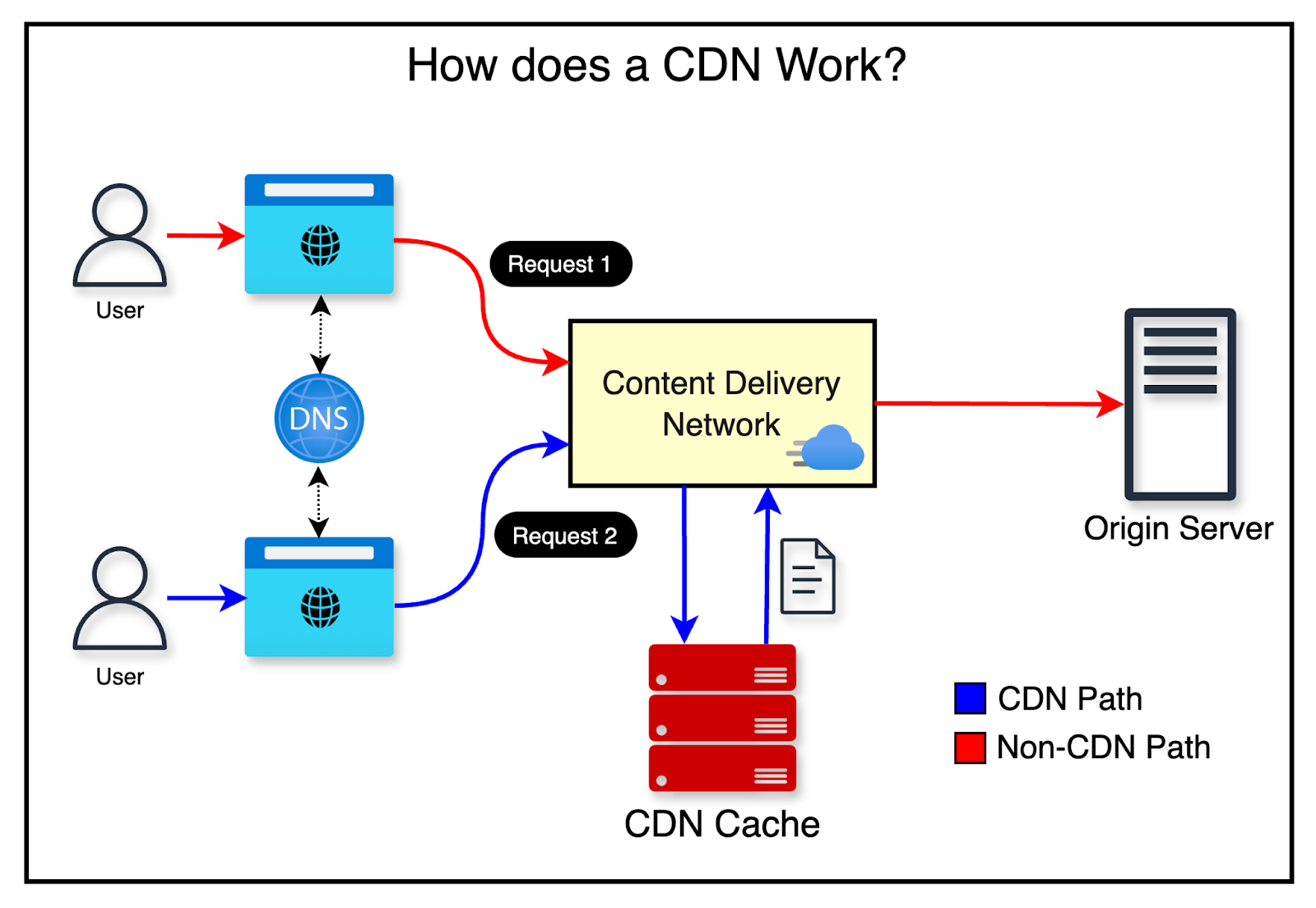
The typical request flow looks like this:
- A user requests an image, which is routed to the nearest CDN node.
- If the image is cached on the CDN, it is returned immediately. Otherwise, the CDN fetches it from the origin server.
- The origin server returns the image with a TTL. The CDN caches the image and returns it to the user.
- Subsequent requests for the same image are served from cache, as long as the TTL has not expired.
When to Use a CDN Since CDNs are provided by third parties, you are charged per data transfer, so it’s worth evaluating whether a CDN is necessary for your use case. A few considerations:
- Cost — Weigh the performance benefits against the transfer costs before adopting a CDN.
- TTL — For time-sensitive content, set an appropriate TTL that reflects how frequently the content changes.
- Failover — Your site should be able to handle CDN outages gracefully and fall back to the origin server.
- Cache Invalidation — Most CDN providers expose APIs to manually invalidate cached content. You can also use object versioning via query strings (e.g.
?v=2) to distinguish between different versions of the same asset.
Stateless Architecture
A stateful server remembers client data between requests. A stateless server retains no session information between requests.
Limitations of Stateful Architecture In a stateful system, each request must be routed to the specific server that holds the user’s session data. While a load balancer can manage this, it significantly increases complexity when adding or removing servers from the pool.
Why We Need Stateless Architecture In a stateless system, HTTP requests from users can be sent to any web server, which then fetches the necessary state from a shared data store. This makes the system simpler, more robust, and easier to scale horizontally.
Data Centers
When we really scale our process, we start adding multiple data centers. Users are usually geoDNS-routed to the closest data center, with traffic split roughly evenly. To achieve this setup, you need to:
- Enable traffic redirection: when a data center goes down, traffic should be routed to the other data center.
- Data Synchronization - users from different regions could use different local databases or caches, and in a failover case, the user should be able to retrieve data from another data center
- Testing for each data center that is built.
Message Queues
A message queue is a simple structure that allows for asynchronous communication between services.
- The Producer/Publisher will create a message and then send it into the queue
- The consumer/subscriber will connect to the mailbox/message queue and perform the actions that are defined by the messages

The reason why this is such a powerful structure is that it decouples multiple services being online at the same time. Using the message queue, the producer can post a message when the consumer is unavailable to process it.
tldr; Good for: background jobs, email sending, image processing, payments reconciliation.
- Messages are tasks.
- Consumers scale horizontally.
- Often supports retries + dead-letter queue.
Logging, Metrics, Automation
For very small systems, you can often skip heavy investment in logging/metrics/automation because complexity is low and issues are easy to spot manually. As the system grows, these become essential for reliability, debugging, and iteration speed.
- Logging
- Captures what the system did (events, decisions, errors) so you can understand business logic as it executes.
- Useful for: debugging incidents, tracing requests, auditing flows, and explaining “why did this happen?”
- Metrics
- Numeric signals you can aggregate and chart to visualize trends and utilization over time.
- Examples:
- Infrastructure: CPU, memory, disk I/O, network, DB/cache latency and throughput
- Product/business: daily active users (DAU), retention, conversion, revenue
- Metrics are ideal for dashboards + alerts because they’re structured and easy to aggregate.
- Automation
- Continuous development and operational improvements that catch problems early and reduce manual work.
- Examples: CI checks/tests, linting, deploy pipelines, schema migrations, automated rollbacks, health checks, alert routing
Database Scaling
Vertical Scaling
Vertical scaling is upgrading a single database machine (more CPU/RAM/faster disk). This mirrors scaling application servers and shares similar drawbacks.
- Pros:
- Simple to reason about
- Often the fastest path early on
- Cons:
- Hard limits eventually (you can’t upgrade forever)
- Still a single primary system to protect (risk of being a bottleneck / single point of failure without replication/HA)
Horizontal Scaling
Horizontal scaling (often via sharding) is adding more database servers rather than upgrading one server.
Sharding splits a large dataset into multiple smaller databases (“shards”). Each shard typically:
- Uses the same schema
- Holds a unique subset of the data
A common approach is to assign users to shards by a stable identifier (e.g., uid). Requests can then be routed to the correct shard.
Sharding Key (Partition Key)
The most important design decision is the sharding key (also called the partition key). It’s one or more columns that determine how data is distributed across shards.
- A good sharding key:
- Distributes load evenly
- Supports the most common query patterns
- Minimizes cross-shard queries/transactions
- The sharding key enables routing:
- You can locate/modify data by sending queries to the correct shard instead of querying every shard.
Common Sharding Challenges
Resharding Data
- Over time, shards can become uneven or fill up.
- You may need to change the sharding function/shard map and move data across shards, which is operationally complex and risky.
Celebrity Problem (Hot Shard)
- Some entities are accessed far more frequently than others, creating “hot spots.”
- Mitigations may include isolating high-traffic entities (e.g., “one shard per celebrity”), caching, or more advanced partitioning strategies.
JOINs / Denormalization
- After sharding, cross-shard joins are expensive or impractical.
- Common patterns:
- Redesign queries to stay within a shard
- Denormalize data so reads can be served from a single shard/table
- Precompute aggregates/materialized views per shard
Linked Map of Contexts